# StartCompareFaces Routine KYC Ecuador
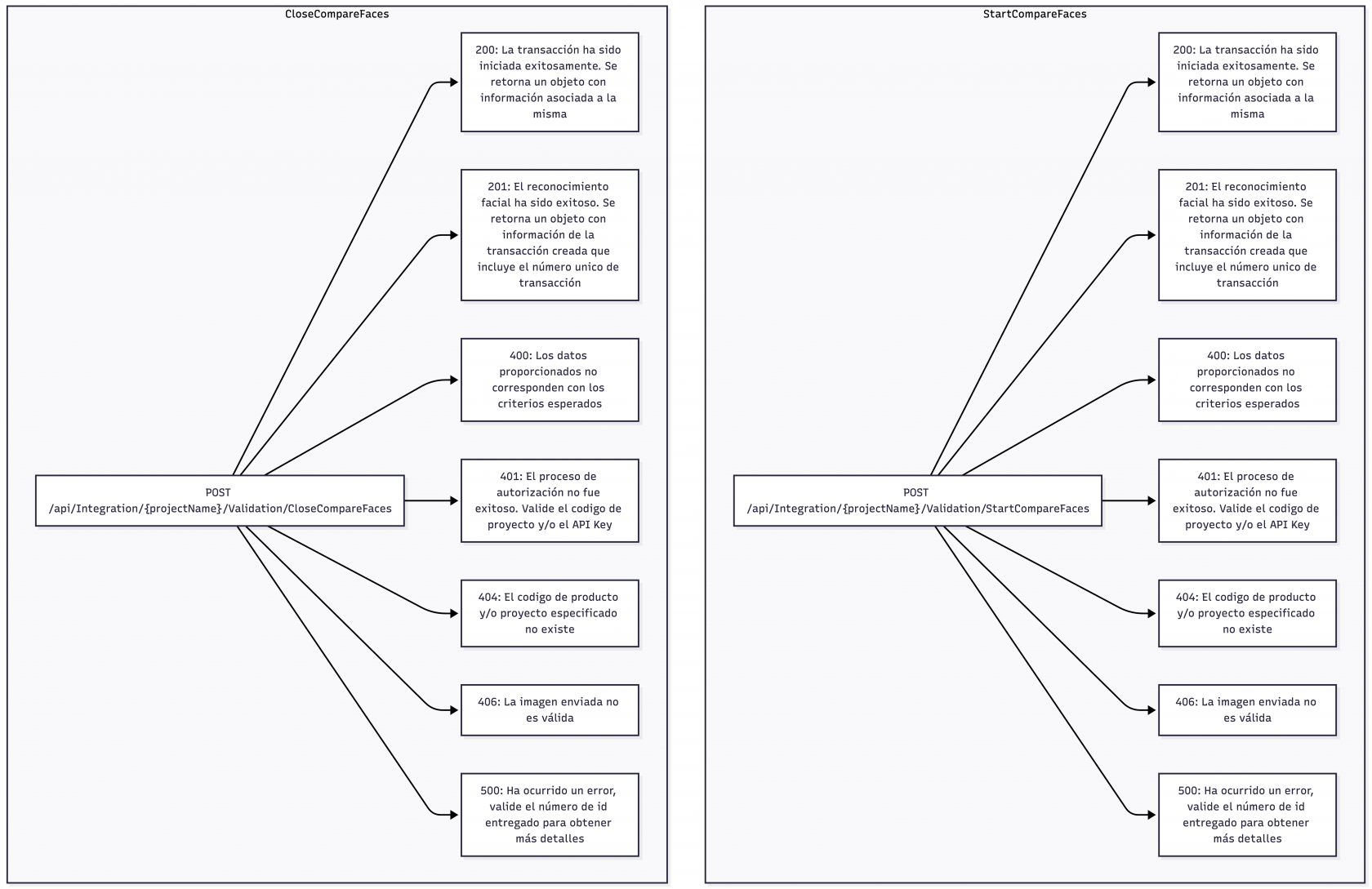
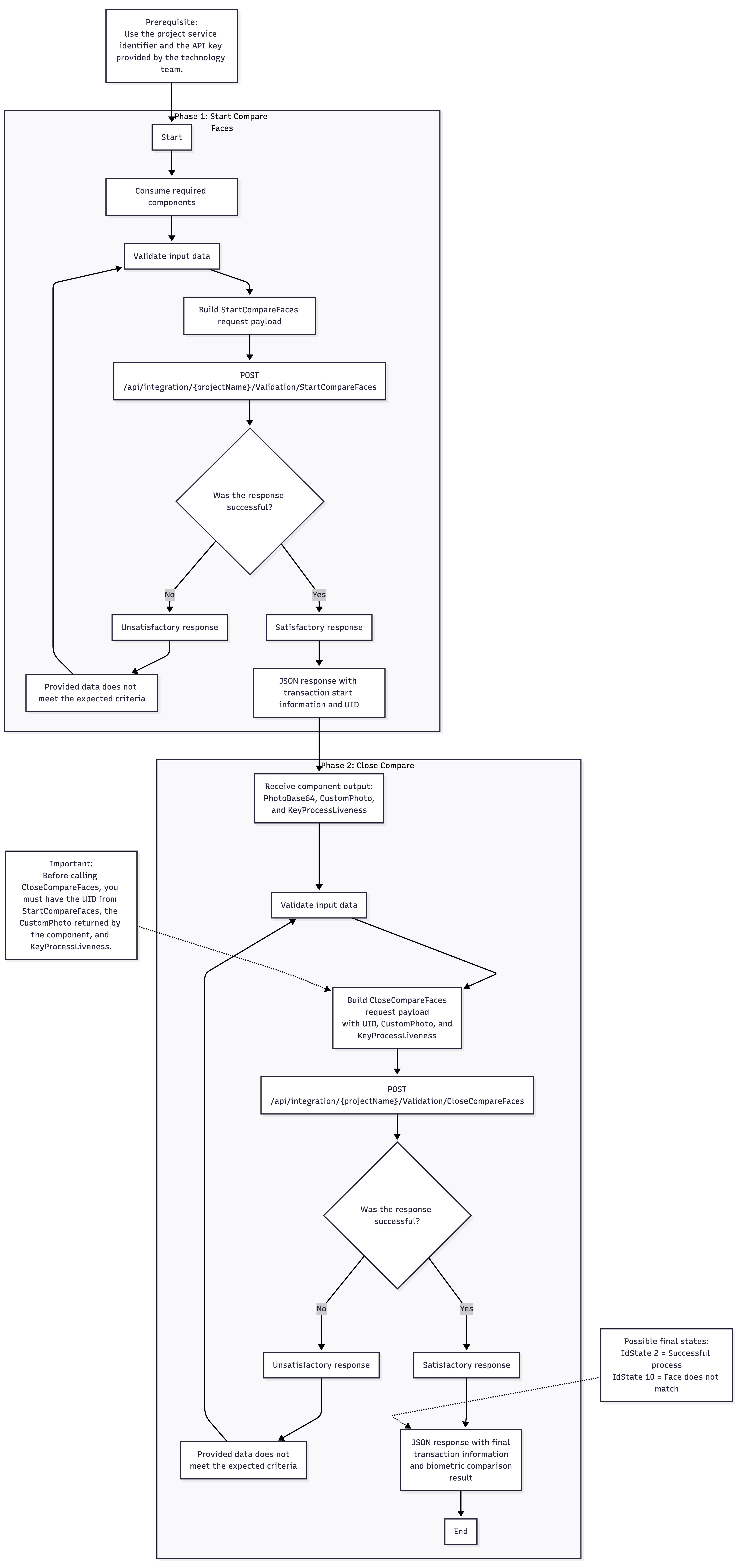
This routine is designed as a two-step face comparison transaction. The process begins with `StartCompareFaces`, which creates the transaction and returns the `Uid` required to continue the flow. The transaction is then completed with `CloseCompareFaces`, where the final customer face image is submitted together with the same `Uid`. The response of the close service can already contain transaction data and comparison result fields through `BaseValidationDto`.
## Services
[](https://docs.ado-tech.com/uploads/images/gallery/2026-03/U5rwXpgVK1uef0DB-liveness-validation-new-2026-03-26-143738.png)
How to Communicate Responses
The integration should communicate `Uid` as the technical correlation value that links the start request to the close request. The final user-facing outcome should be derived from the response returned by `CloseCompareFaces`, since that call completes the routine and can return transaction data and comparison result indicators. If the consuming platform needs additional audit or expanded transaction details, the returned `TransactionId` can later be used in other validation lookup flows already documented in the project.
## Response Received
Both services return data aligned with `BaseValidationDto`. Relevant fields include `Uid`, `TransactionId`, customer identification data, and several face-comparison-specific properties exposed by the Swagger model, such as `ComparationFacesSuccesful`, `ResultComparationFaces`, `ComparationFacesAproved`, `ThresholdCompareDocumentFaces`, and `CompareFacesDocumentResult`. The start request schema is defined by `ApiValidationCompareFaces`, which includes fields such as `ProductId`, `CustomerServicePhoto`, `SignaturePhoto`, `DactilarCode`, `IdentificationNumber`, `Name`, `DocumentType`, `longitude`, `Latitude`, `UrlCallback`, `Gender`, and `BirthDate`. The close request schema is defined by `ApiCloseValidationCompareFaces`, which includes `CustomerPhoto`, `Uid`, and `KeyProcessLiveness`.
## Flow Diagram
[](https://docs.ado-tech.com/uploads/images/gallery/2026-03/FixKKwL844bUnBoU-liveness-validation-new-2026-03-26-144428.png)
## Service Invocation
The integrator starts by calling `StartCompareFaces` and storing the returned `Uid`. That `Uid` must be reused in `CloseCompareFaces`, together with the customer photo and, when applicable, the liveness process key. Once `CloseCompareFaces` returns, the consuming application can evaluate the transaction identifiers and the face comparison result fields included in the response body.
## Recommendations
The same `Uid` must be preserved without modification between the two calls. The implementation should validate the quality of both the service-side source image and the customer photo to reduce `406` responses. If the flow depends on liveness, the `KeyProcessLiveness` should be obtained before the close call and passed exactly as issued by the upstream component. Because the Swagger exposes comparison result fields directly in `BaseValidationDto`, downstream systems should parse those fields explicitly instead of relying only on the HTTP code.